Uploads or Watch links not working
Fixes for Link takes that stay on your computer, Share that won't upload, and Watch pages that won't play.
Most upload problems come from a connection that is missing or has expired. Start with Settings → Connected services: the BestShot workspace and Google Drive (or GoHighLevel) should both say Connected.
A Link take was only saved on your computer
If the upload card says Not uploaded · saved on this Mac, BestShot kept the recording but could not upload it. The card says why, for example that Google Drive is not connected in your Watch workspace.
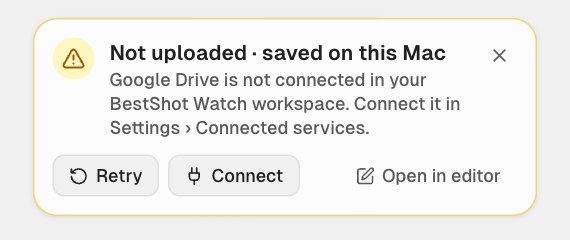
- Click Connect (or open Settings → Connected services) and connect what's missing. See Connect Google Drive.
- Click Retry on the card.
Also check Settings → Uploads: at least one of Google Drive (via Watch) or GoHighLevel (via Watch) must be on, and Upload Link recordings automatically must be on.
Export & Upload is greyed out
The chosen destination isn't connected. The status card under Upload to shows what's missing, with Connect… to fix it. GIFs can't be uploaded through Watch: export as MP4, or use Choose… to send a GIF to GoHighLevel on your computer.
Your Google Drive is full
Uploads to Drive fail when there isn't enough space left in your Google account. Free up space in Google Drive, or add storage in your Google account, then click Retry.
The upload stopped part way
Click Retry on the card, in the editor header or in the upload details. BestShot reuses the export it already made, and destinations that finished are not uploaded again. If BestShot was quit during an upload, it carries on by itself the next time you open it.
A Watch page won't play
- Drive was disconnected. Watch pages for videos in Drive can't play until you reconnect Drive in your Watch account menu.
- The file was deleted or moved out of reach in Drive or GoHighLevel. Watch plays the video from there, so it needs the file.
- The page has expired. On the Free plan Watch keeps shared recordings for 7 days. See Free and Cloud.
- The viewer can't open it. Private pages need the viewer to be signed in to your workspace. Change the page to Anyone with the link if needed. See Choose who can watch.
The workspace won't connect
When you click Connect workspace, approve access on the page that opens in your browser within 5 minutes. If it times out, click Connect workspace again.
Still stuck? Email support and tell us what you tried.